
How Does Quick Audience Profit System Work? Step-by-Step Guide
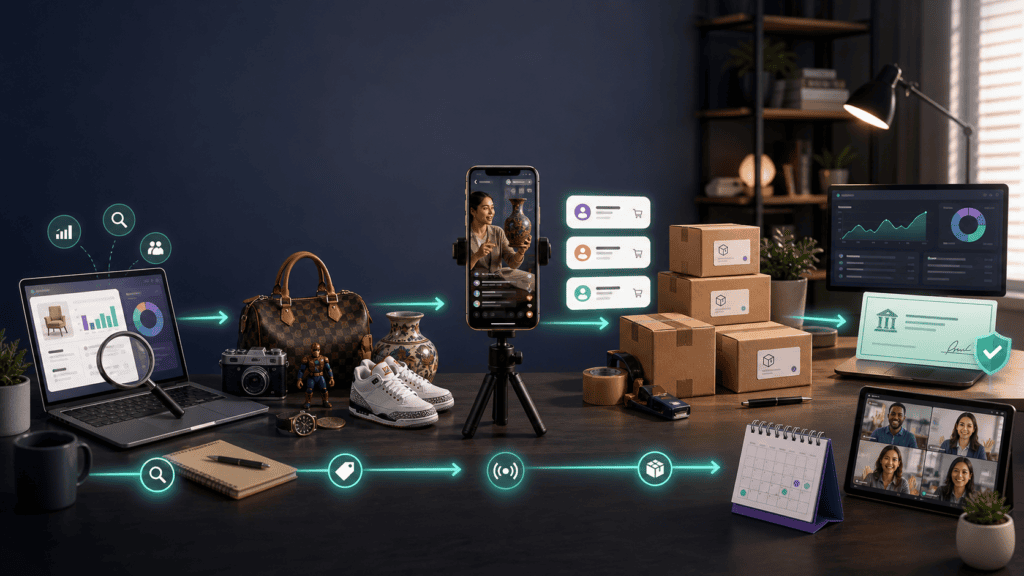
Quick Audience Profit System works by teaching members how to select products, source inventory and sell through live video shows on Whatnot.
It combines four types of support:
- Step-by-step business training
- AI-assisted sourcing tools and supplier resources
- Live group coaching and community access
- A guided 30-day launch sprint
The system does not operate the business for you. Members must obtain seller access, acquire products, prepare listings, run shows, pack orders and ship them.
The complete workflow looks like this:
Check eligibility → Choose a category → Research products → Source inventory → Prepare listings → Schedule a show → Sell live → Ship orders → Receive payouts → Analyze and repeat
This guide explains what happens at every stage, which tasks Quick Audience helps with and which responsibilities remain with the seller.
Quick Audience’s four-part support system
| Support layer | What it provides | What the member must do |
|---|---|---|
| Training | Lessons covering the live-selling process | Study and implement them |
| Research tools | AI sourcing assistance and supplier resources | Verify demand, costs and suppliers |
| Launch support | Scripts, templates and a 30-day sprint | Prepare and run an actual show |
| Ongoing support | Group coaching and private community | Ask questions, test ideas and improve |
The main value proposition is reducing confusion and trial and error. It does not remove the commercial risks of inventory, fees, fluctuating demand or platform dependence.
Before starting: confirm that you can sell on Whatnot
Seller eligibility should be checked before purchasing a high-ticket training program.
As of July 2026, Whatnot accepts seller applications from:
- United States, including Puerto Rico and the US Virgin Islands
- Austria
- Australia
- Belgium
- Canada
- France
- Germany
- Netherlands
- United Kingdom
Whatnot currently excludes Guam, Jersey, Guernsey and the Isle of Man from the relevant country listings. Countries not listed—including India—are not currently supported for seller applications.
Location rules can change, so check Whatnot’s official seller-location requirements before enrolling.
Certain product categories may also require additional approval.
Step 1: Learn how live selling works
Quick Audience begins by explaining the difference between a normal ecommerce listing and a live-selling show.
With a conventional marketplace listing, the customer:
- Searches for a product.
- Studies photographs and a description.
- Compares prices.
- Places an order.
During a live show, the customer watches products being presented in real time. Viewers can ask questions, place bids, purchase fixed-price products and interact with the seller.
This creates both an opportunity and an additional responsibility.
A live seller can demonstrate product condition, answer objections and build a community. The seller must also maintain the show’s pace, describe items accurately and respond professionally.
Quick Audience’s introductory training is intended to explain:
- Whatnot’s marketplace structure
- Auctions and fixed-price sales
- How shows are discovered
- The importance of repeat viewers
- Basic equipment requirements
- Common product strategies
- The difference between sales and profit
- The work involved after a show ends
Step 2: Apply for seller access
Whatnot controls the application and approval process. Quick Audience can provide guidance, but it cannot approve accounts.
According to Whatnot’s current application guide, applicants use the app to provide information about:
- Their primary selling category
- Previous selling experience
- Current sales activity, if applicable
- Other marketplace profiles
- Social media accounts
- Their legal name
- Their return address
Whatnot says most eligible applicants receive access quickly, although some applications need additional review.
Common reasons an application may not be approved include:
- Unsupported location
- Incomplete information
- Insufficient or unclear inventory
- Unsupported products
- Counterfeit or inauthentic products
- Poor selling history
- Trust and safety concerns
The program may help members organize their application, select the right category and understand what Whatnot expects. Approval remains entirely under Whatnot’s control.
Step 3: Choose a product category
Once eligibility is confirmed, the next step is deciding what to sell.
Quick Audience’s supplied seller examples include several business styles:
| Seller | Reported product strategy |
|---|---|
| Amanda | Vintage items and antiques |
| Kaleigh | Children’s clothing sold through rapid auctions |
| Brandon | Collectible coins |
| Alyssa | Lego minifigures |
| Merre | Vintage finds and handmade products |
| Kyle | Lavender coffee, tea and honey |
| Caitlyn | Crystals and artwork |
These are promotional case studies rather than typical-results data, but they illustrate the range of possible categories.
A suitable category should balance:
- Personal knowledge
- Buyer demand
- Product availability
- Storage requirements
- Shipping difficulty
- Competition
- Average selling price
- Expected profit margin
- Opportunities for repeat purchases
Volume model versus margin model
A volume seller may move hundreds of low-priced products through fast auctions. This can produce many transactions but also creates substantial preparation and fulfillment work.
A margin-focused seller may present fewer, higher-value items. This reduces order count but requires stronger product knowledge and greater buyer trust.
Neither model is automatically superior. The right option depends on sourcing cost, available time and the category.
Step 4: Research products and calculate margins
Quick Audience reportedly provides AI-assisted sourcing software, category guidance and a supplier database.
These resources are intended to help members identify possible products without researching every idea manually.
The software may assist with:
- Generating product ideas
- Comparing possible niches
- Organizing research
- Finding potential sourcing directions
- Creating product shortlists
- Evaluating category opportunities
The member must still calculate the economics.
A basic formula is:
Expected profit = Selling price − product cost − platform fees − packaging − seller-paid shipping − other expenses
For example, a product expected to sell for $20 may not be attractive if it costs $12 to acquire and requires several dollars in fees and packaging.
What the sourcing tools cannot know
No AI tool can predict every variable, including:
- An item’s exact condition
- Local purchasing costs
- Show attendance
- Auction behavior
- Shipping damage
- Sudden competition
- Returns
- The seller’s presentation quality
- Future platform changes
The software should be treated as a research assistant, not an automatic profit generator.
Step 5: Source a small test inventory
After identifying possible products, the member acquires enough inventory for an initial show.
Potential sourcing channels include:
- Personal belongings
- Existing collections
- Thrift stores
- Estate and garage sales
- Clearance departments
- Facebook Marketplace
- Local auctions
- Liquidation companies
- Wholesale suppliers
- Consignment arrangements
- Handmade products
Starting with a small test inventory reduces the amount of money tied up before demand has been demonstrated.
Before ordering from a supplier, verify:
- Business and contact information
- Minimum order quantities
- Product authenticity
- Shipping charges
- Delivery times
- Damage and return procedures
- Complete landed cost
- Recent selling prices
- Marketplace restrictions
- Expected net margin
Access to a supplier list does not make every supplier or product suitable.
Step 6: Prepare the live-selling setup
A professional studio is not required.
A basic setup may include:
- Smartphone
- Stable phone stand or tripod
- Reliable internet connection
- Suitable lighting
- Clean presentation surface
- Organized inventory
- Packaging materials
- Shipping scale
- Label printer or standard printer
The program reportedly provides setup guidance, scripts and show-planning templates.
Can the seller remain faceless?
Yes. A show can focus on the products or the seller’s hands.
Possible faceless arrangements include:
- Overhead table view
- Product display stand
- Rotating platform
- Camera pointed at a demonstration area
- Distinctive gloves or visual theme
The seller generally still needs to speak, explain condition and answer comments.
Can a seller practice first?
Whatnot allows sellers to create private shows and provides a rehearsal option for practicing with simulated activity. Its private-show guide explains the current options.
A rehearsal can help test:
- Camera position
- Sound
- Lighting
- Product order
- Auction controls
- Opening script
- Show pacing
Be careful when using an ordinary private show: real purchases can still occur unless the platform’s rehearsal functionality is being used.
Step 7: Create product listings
Whatnot currently supports two main selling formats:
- Auction: Buyers place competing bids during a set period.
- Buy It Now: The seller sets a fixed purchase price.
Sellers can also use:
- Temporary listings created for one show
- Detailed listings that remain visible afterward
- Products reserved for a specific live show
- Fixed-price profile-shop products
- Flash sales where available
According to Whatnot’s listing guide, adding products before the show can make the broadcast more organized and allow buyers to browse in advance.
Each listing should contain accurate information about:
- Product identity
- Condition
- Quantity
- Measurements or specifications
- Defects
- Weight
- Starting price or fixed price
- Shipping profile
Accurate weight is particularly important because it affects shipping charges.
Step 8: Schedule and promote the show
The seller schedules a show through Seller Hub.
Whatnot’s current show-scheduling instructions require a seller to select:
- Show name
- Date and time
- Primary category
- Selling format
Optional settings include:
- Thumbnail or preview video
- Discovery tags
- Repeat schedule
- Moderators
- Show notes
- Shipping settings
- Public or private visibility
Scheduling in advance allows potential buyers to bookmark the show and receive a notification when it begins.
Quick Audience’s templates may help the member create:
- A clear show title
- An opening script
- Product presentation notes
- An inventory sequence
- Auction starting prices
- Calls to follow the seller
- A closing script
Is an existing audience required?
A large external following is not mandatory.
Whatnot can provide marketplace discovery, but it does not guarantee viewers. Sellers may improve their chances by:
- Scheduling consistently
- Selecting the correct category
- Creating a clear thumbnail
- Adding products in advance
- Sharing the show link
- Using an accurate, specific title
- Giving followers time to bookmark the show
Step 9: Run the live show
When the scheduled time arrives, the seller opens the show through Seller Hub and starts broadcasting.
A typical show may follow this structure:
1. Welcome viewers
Explain the show’s theme, products and sales format.
2. Set expectations
Tell buyers whether the show uses auctions, fixed prices, rapid sales or a mixture.
3. Present each product
Describe:
- What it is
- Its condition
- Important measurements
- Any flaws
- Included accessories
- Relevant background
- Starting or fixed price
4. Answer questions
Respond to buyers without making claims that cannot be supported.
5. Run the sale
Start the auction or direct buyers to the fixed-price listing.
6. Maintain the show’s pace
Introduce upcoming items and acknowledge new viewers.
7. Encourage future engagement
Invite interested viewers to follow the account or bookmark another scheduled show.
The seller can monitor viewers, chat, orders and estimated sales through Whatnot’s show-management tools.
Step 10: Understand how fees are deducted
When a buyer completes a purchase, Whatnot deducts applicable seller and payment-processing fees.
For most US categories, the standard fee structure currently includes:
- 8% commission on the final selling price
- 2.9% payment-processing fee on the buyer’s total order value
- $0.30 fixed transaction fee
Rates vary by category and region. Temporary fee promotions may also apply. Always consult Whatnot’s current fee schedule.
Example of a $50 sale
Whatnot’s official US example uses:
- Final selling price: $50
- Commission: $4
- Buyer’s total order value: $58.70
- Processing fee: $2
- Platform earnings after those fees: $44
That $44 is not necessarily profit. The seller must still deduct the cost of the item, packaging and other business expenses.
The actual money flow is:
Buyer pays Whatnot → Whatnot deducts applicable fees → Seller ships the order → Delivery is confirmed → Earnings become available → Seller requests a payout
Step 11: Pack and ship the orders
After the show, the seller opens the Shipments section in Seller Hub and prepares each order.
Whatnot’s current shipping policy requires sellers to ship within two business days, excluding weekends and holidays.
An order is considered shipped when it receives an accepted drop-off scan—not merely when a label is generated.
The seller typically needs:
- Boxes or mailers
- Protective material
- Tape
- Shipping scale
- Printer
- Correct labels
- Organized sold inventory
The fulfillment process includes:
- Check the order details.
- Match the correct item to the buyer.
- Confirm package weight.
- Generate the label.
- Pack the product safely.
- Attach the correct label.
- Drop it off with the specified carrier.
- Confirm the shipment scan.
- Monitor tracking.
Buyers normally pay shipping at checkout, although sellers can incur shipping costs through discounts, giveaways or adjustments.
Step 12: Receive the payout
For most sellers, earnings become available after the carrier confirms delivery.
Once funds move into the available balance, the seller can request a transfer to a linked bank account. Whatnot says most requested payouts arrive within one or two business days, excluding weekends and banking holidays. Payout timing varies by country and shipping method.
Eligible established sellers may receive Early Payout, which can make earnings available when a shipping label is generated. New sellers should not assume they will have immediate access to that feature.
Step 13: Calculate true profit
After the show, Quick Audience members should review more than the gross sales figure.
Track:
- Number of viewers
- Number of buyers
- Products presented
- Products sold
- Average selling price
- Product acquisition cost
- Platform fees
- Packaging expenses
- Giveaways
- Refunds
- Time spent preparing
- Time spent broadcasting
- Time spent shipping
- Final net profit
A show can generate significant revenue but weak profit when products sell below their intended margin.
A smaller show with carefully sourced inventory can sometimes produce a healthier return.
Step 14: Use coaching and community support
Quick Audience reportedly includes twelve months of live group coaching and private community access.
Members can use these resources to discuss:
- Low attendance
- Product selection
- Pricing problems
- Show structure
- Sourcing difficulties
- Shipping systems
- Repeat-buyer strategies
- Scaling inventory
The purpose is to shorten the feedback loop:
Take action → Measure the result → Ask for feedback → Make an adjustment → Run another show
Group coaching cannot eliminate market risk, but it may help members identify errors faster than working entirely alone.
Step 15: Repeat successful shows
The final stage is turning an isolated broadcast into a repeatable schedule.
This involves:
- Reordering products that sold profitably
- Discontinuing weak inventory
- Improving titles and thumbnails
- Adjusting show times
- Refining auction lengths
- Building relationships with repeat buyers
- Preparing fulfillment more efficiently
- Scheduling the next show
The seller examples supplied with the promotion frequently emphasize consistency.
Amanda reportedly follows a weekly schedule, while Caitlyn is described as going live on the same night and time. Kyle reportedly uses live demonstrations to attract people interested in his products.
These promotional examples do not guarantee similar results, but they illustrate the intended long-term approach: build a recognizable show that buyers choose to revisit.
How the 30-day launch sprint fits the process
The exact assignments should be confirmed inside the program, but the advertised sprint is designed to move members through the implementation stages.
An illustrative 30-day timeline might look like this:
| Period | Primary objective |
|---|---|
| Days 1–5 | Check eligibility and study the platform |
| Days 6–10 | Choose a category and research products |
| Days 11–15 | Source a small inventory and calculate margins |
| Days 16–20 | Prepare listings, equipment and show scripts |
| Days 21–25 | Rehearse, schedule and run the first show |
| Days 26–30 | Ship orders, calculate profit and improve the next show |
This is an example of how the resources can be used—not a promise that every member launches or becomes profitable within 30 days.
What Quick Audience does and does not automate
| Quick Audience may provide | Quick Audience does not do |
|---|---|
| Explain the process | Guarantee seller approval |
| Suggest sourcing directions | Purchase inventory |
| Provide supplier resources | Verify every supplier |
| Supply scripts and templates | Present the products |
| Help plan a show | Guarantee viewers |
| Provide coaching | Guarantee sales |
| Offer a launch schedule | Pack orders |
| Help members troubleshoot | Remove platform fees |
| Assist with research | Guarantee profit |
The system provides direction and support. The member remains the business operator.
How long does the complete process take?
Different parts of the process follow different timelines:
- Seller application: Whatnot says most eligible applicants receive access quickly, although some require review.
- Training: Recorded lessons can generally be completed at the member’s pace.
- Launch preparation: The program advertises a guided 30-day sprint.
- Shipping: Whatnot currently requires shipment within two business days.
- Payout: Earnings generally become available after confirmed delivery, followed by the payout-transfer period.
- Profitability: No reliable timeline can be promised.
Running one show is a short-term objective. Building a dependable audience and profitable inventory system is a longer-term process.
Who is this workflow best suited to?
The system may fit people who:
- Want an active product business
- Can apply to sell from a supported location
- Are comfortable speaking during shows
- Have access to suitable inventory
- Can pack and ship promptly
- Want coaching and accountability
- Can afford tuition and operating costs
- Are willing to improve through repeated shows
It is a poor fit for someone who wants:
- Passive income
- Guaranteed platform traffic
- Automatic product selection
- No customer interaction
- No physical fulfillment
- Guaranteed first-month earnings
- A business independent of third-party marketplaces
Read our Quick Audience pros and cons before deciding.
Is Quick Audience required to sell on Whatnot?
No. Anyone who meets Whatnot’s requirements can apply directly and learn through the platform’s free help resources.
Quick Audience is a separate paid education product. Its value proposition is structured instruction, sourcing assistance, templates, coaching and accountability.
People who learn well independently may prefer to test Whatnot without purchasing high-ticket training. People who want a guided implementation process may place greater value on the package.
Final verdict: how Quick Audience works
Quick Audience Profit System works as a guided framework around a real live-commerce operation.
It helps members move through four broad phases:
- Learn the platform.
- Research and acquire products.
- Launch and fulfill live shows.
- Review results and build a repeat audience.
The training may make the process easier to understand, but members still carry out every meaningful business task.
Before enrolling:
- Confirm that your location is supported.
- Observe shows in your intended category.
- Calculate realistic product margins.
- Budget for inventory and supplies.
- Review the price and guarantee.
- Decide whether live selling fits your schedule.
If the workflow still appeals to you, the free presentation is the appropriate next step.
Frequently asked questions
Is Quick Audience a done-for-you business?
No. It provides education, research tools, templates and support. Members must source inventory, run shows and fulfill orders.
Does Quick Audience automatically find buyers?
No. Whatnot may provide marketplace discovery, but neither the platform nor the course guarantees show attendance.
Can I use the system without showing my face?
Yes. Product-focused and hands-only broadcasts are possible, although voice interaction is generally still required.
Do I need paid advertising?
Paid advertising is not required to begin. Sellers may still need to share show links, schedule consistently and build followers.
Does Quick Audience supply inventory?
No. Members source or create their own products.
How does the AI software fit into the process?
It assists with product research and sourcing ideas. It does not guarantee that an item will sell profitably.
How do sellers receive payment?
Whatnot processes the buyer’s payment, deducts applicable fees and makes the remaining earnings available according to its payout schedule.
Is a smartphone enough to start?
A suitable smartphone can be enough for broadcasting. Sellers may also need a tripod, lighting, packaging materials, scale and printer.
How quickly must orders be shipped?
Whatnot currently requires sellers to ship orders within two business days, excluding weekends and holidays.
Does the 30-day sprint guarantee profit?
No. It is an implementation framework intended to help members prepare and launch. Earnings and profit are not guaranteed.